This is the multi-page printable view of this section. Click here to print.

Return to the regular view of this page.

REST API

Maxx Control REST API on each Innosonix amplifier: auth, hierarchy, OPTIONS, AES67 / SDP subscribe, and where the full OpenAPI lives.

Every amplifier exposes a hierarchical JSON REST API used by Maxx Control itself and by third-party systems. Prefer this API for single-device integration. For project-level multi-amp control, use the Maxx Remote HTTP API instead.

Base URL and transport

ItemValue
Scheme / porthttp:// on port 80
Base path/rest-api
Examplehttp://${IP}/rest-api/settings/channel/1/dsp/mute

Methods you will use most: GET (read), PUT (write / partial update), OPTIONS (allowed ranges and constraints), plus POST / DELETE on a few resources (for example EQ bands).

Authentication

Write operations that change settings require an API key in the HTTP header:

HeaderDefault value
tokenf4005bf8507999192162d989d5a60823

Defined in OpenAPI as ApiKeyAuth (token in header). GET and most OPTIONS calls do not require the token. Most PUT (and many DELETE) calls do — check the on-device OpenAPI for each path; a few DELETE endpoints are unauthenticated in the schema.

curl -X PUT "http://${IP}/rest-api/settings/channel/1/dsp/mute" \
  -H "token: f4005bf8507999192162d989d5a60823" \
  -H "Content-Type: application/json" \
  -d '{"value": true}'

Hierarchical resources

The tree is organized under /settings (configuration), /status (live state), /info, /preset, and helpers such as /speakerpreset. Channel resources nest DSP blocks (volume, mute, EQ, FIR, limiters, …); device resources cover master mute/volume, Dante, network, and more.

You can:

  • PUT a deep leaf, e.g. …/settings/channel/1/dsp/mute
  • PUT a parent with a partial JSON object, e.g. …/settings/channel with an array of channel objects
  • PUT …/settings with a larger tree when you need a wide update in one call

Example shape under settings (not exhaustive):

settings/
  channel/
    {channel_id}/
      ampenable
      dsp/
        delay | eq | eqenable | fir | mute | volume | …
  device/
    dsp/ (mute, volume, …)
    dante/
    network/

Partial updates are the normal pattern: send only the fields you want to change.

OPTIONS = parameter constraints

OPTIONS on a resource returns the allowed parameter space for that property (min / max / step / unit, enums, string lengths, and similar). Use it when building UIs or validating values before PUT — especially for volume, delay, limiters, and names.

Example: discover channel volume limits:

curl -X OPTIONS "http://${IP}/rest-api/settings/channel/1/dsp/volume"

Exact response fields vary by resource; see the on-device OpenAPI schemas (for example NumberOptions).

Full OpenAPI (source of truth)

This site documents common integrator patterns. The complete, firmware-matching schema is on the device:

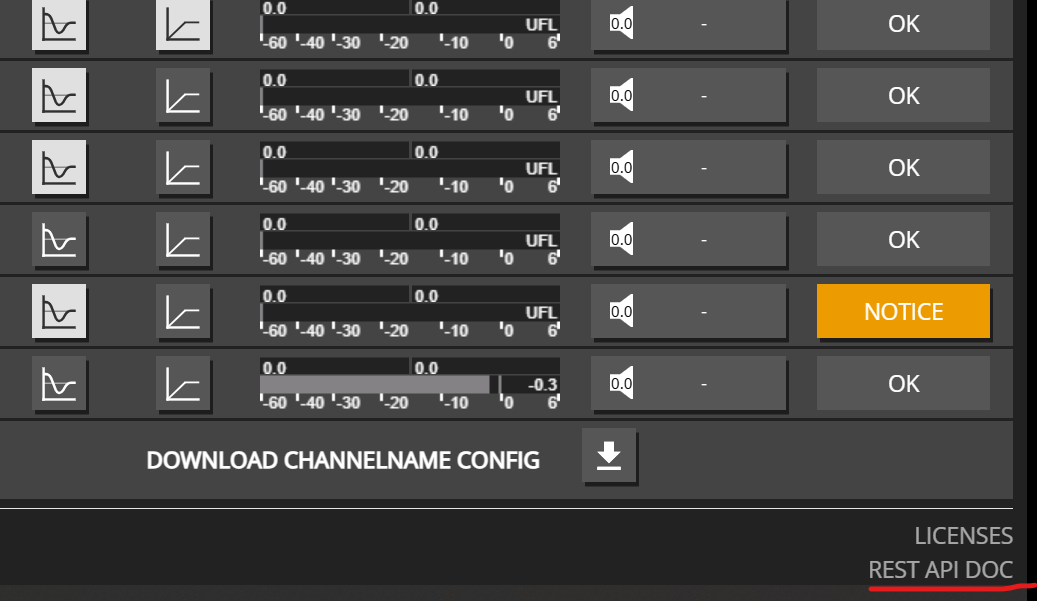
  1. Open Maxx Control → OVERVIEW
  2. Click REST API DOC (lower right)

That opens the Swagger UI for maxx_rest_api.html (generated from the device OpenAPI). Always trust the on-device docs for path lists and schemas for your firmware version.

Common use cases

GoalSee
Mute / unmute a channel or masterMute control
Set channel, master, or multi-zone volumeVolume control
AES67 / SDP subscribe (channel input patch)AES67 / SDP subscribe
Enable / disable channel EQEQ enable control
Read device info and health-oriented statusDevice information
Persist settings to the deviceSave / persist
Amp channel power (ampenable)Amp enable
Device-level mute / volume / startupDevice control
Channel namingChannel name
Input patchInput patch

Third-party plugins (Q-SYS, Loxone, …) use this same API against one amplifier each — see Third-party plugins.

1 - Maxx Control REST: Set channel names

Maxx Control REST: get and set channel names for zones, UI labels, and home-automation integrations.

Use the Maxx Control REST API to get and set channel names so zones and automation UIs stay readable. Names can contain alphanumeric characters, spaces, and special characters.

Get Channel Name

Retrieve the current name of a channel:

curl -X 'GET' http://${IP}/rest-api/settings/channel/1/name
{
  "value": "Living Room Left"
}

Set Channel Name

Set or update the name of a channel. Channel names can be up to 256 characters and support:

  • Letters (a-z, A-Z)
  • Numbers (0-9)
  • Spaces
  • Special characters: äöü:_()!%+*#-
curl -X 'PUT' http://${IP}/rest-api/settings/channel/1/name \
-H 'Content-Type: application/json' \
-H 'token: f4005bf8507999192162d989d5a60823' \
-d '{
  "value": "Living Room Left"
}'
{
  "value": "Living Room Left"
}

Set Multiple Channel Names

Set names for multiple channels in a single request:

curl -X 'PUT' http://${IP}/rest-api/settings/channel/ \
-H 'Content-Type: application/json' \
-H 'token: f4005bf8507999192162d989d5a60823' \
-d '[
  {
    "channel_id": 1,
    "name": {
      "value": "Living Room Left"
    }
  },
  {
    "channel_id": 2,
    "name": {
      "value": "Living Room Right"
    }
  },
  {
    "channel_id": 3,
    "name": {
      "value": "Kitchen"
    }
  },
  {
    "channel_id": 4,
    "name": {
      "value": "Bedroom"
    }
  }
]'
[
  {
    "channel_id": 1,
    "name": {
      "value": "Living Room Left"
    }
  },
  {
    "channel_id": 2,
    "name": {
      "value": "Living Room Right"
    }
  },
  {
    "channel_id": 3,
    "name": {
      "value": "Kitchen"
    }
  },
  {
    "channel_id": 4,
    "name": {
      "value": "Bedroom"
    }
  }
]

Get Maximum Channel Name Length

Check the maximum allowed length for channel names:

curl -X 'OPTIONS' http://${IP}/rest-api/settings/channel/1/name
{
  "length": 256
}

Example: Naming a Multi-Zone Setup

Here’s a practical example for naming channels in a multi-zone audio system:

curl -X 'PUT' http://${IP}/rest-api/settings/channel/ \
-H 'Content-Type: application/json' \
-H 'token: f4005bf8507999192162d989d5a60823' \
-d '[
  {
    "channel_id": 1,
    "name": {
      "value": "Zone 1 - Main"
    }
  },
  {
    "channel_id": 2,
    "name": {
      "value": "Zone 2 - Kitchen"
    }
  },
  {
    "channel_id": 3,
    "name": {
      "value": "Zone 3 - Bedroom"
    }
  },
  {
    "channel_id": 4,
    "name": {
      "value": "Zone 4 - Office"
    }
  }
]'
[
  {
    "channel_id": 1,
    "name": {
      "value": "Zone 1 - Main"
    }
  },
  {
    "channel_id": 2,
    "name": {
      "value": "Zone 2 - Kitchen"
    }
  },
  {
    "channel_id": 3,
    "name": {
      "value": "Zone 3 - Bedroom"
    }
  },
  {
    "channel_id": 4,
    "name": {
      "value": "Zone 4 - Office"
    }
  }
]

Tip: Use descriptive channel names to make your system easier to manage, especially when integrating with home automation systems or control interfaces.

2 - Maxx Control REST: Control device mute and volume

Maxx Control REST: set device master mute, master volume, and startup mute for one Innosonix amplifier.

Use the Maxx Control REST API to set device-level master mute, master volume, and startup mute on one amplifier. These controls affect all channels globally — useful for emergency mute, master volume, and safe startup behavior.

Device Mute

The device mute acts as a master mute that affects all channels, regardless of individual channel mute settings.

Get Device Mute State

curl -X 'GET' http://${IP}/rest-api/settings/device/dsp/mute
{
  "value": false
}

Set Device Mute

curl -X 'PUT' http://${IP}/rest-api/settings/device/dsp/mute \
-H 'Content-Type: application/json' \
-H 'token: f4005bf8507999192162d989d5a60823' \
-d '{
  "value": true
}'
curl -X 'PUT' http://${IP}/rest-api/settings/device/dsp/mute \
-H 'Content-Type: application/json' \
-H 'token: f4005bf8507999192162d989d5a60823' \
-d '{
  "value": false
}'

Device Volume

The device volume acts as a master volume control that affects all channels. Individual channel volumes are relative to this setting.

Get Device Volume

curl -X 'GET' http://${IP}/rest-api/settings/device/dsp/volume
{
  "value": 0.0
}

Set Device Volume

curl -X 'PUT' http://${IP}/rest-api/settings/device/dsp/volume \
-H 'Content-Type: application/json' \
-H 'token: f4005bf8507999192162d989d5a60823' \
-d '{
  "value": -5.0
}'
{
  "value": -5.0
}

Note: Device volume range is -72.0 dB to +24.0 dB. This setting affects all channels globally.

Startup Mute

Configure whether the device should start muted after a reboot or power cycle.

Get Startup Mute Setting

curl -X 'GET' http://${IP}/rest-api/settings/device/dsp/startupmute
{
  "value": false
}

Set Startup Mute

When enabled, the device will start muted after reboot or power cycle:

curl -X 'PUT' http://${IP}/rest-api/settings/device/dsp/startupmute \
-H 'Content-Type: application/json' \
-H 'token: f4005bf8507999192162d989d5a60823' \
-d '{
  "value": true
}'
curl -X 'PUT' http://${IP}/rest-api/settings/device/dsp/startupmute \
-H 'Content-Type: application/json' \
-H 'token: f4005bf8507999192162d989d5a60823' \
-d '{
  "value": false
}'

Use Case: Enable startup mute to prevent audio from playing immediately after power restoration, giving you time to verify system status before audio begins.

Complete Device Control Example

Here’s an example that combines multiple device-level controls:

# Set device to start muted
curl -X 'PUT' http://${IP}/rest-api/settings/device/dsp/startupmute \
-H 'Content-Type: application/json' \
-H 'token: f4005bf8507999192162d989d5a60823' \
-d '{"value": true}'

# Set master volume to a safe level
curl -X 'PUT' http://${IP}/rest-api/settings/device/dsp/volume \
-H 'Content-Type: application/json' \
-H 'token: f4005bf8507999192162d989d5a60823' \
-d '{"value": -10.0}'

# Unmute device when ready
curl -X 'PUT' http://${IP}/rest-api/settings/device/dsp/mute \
-H 'Content-Type: application/json' \
-H 'token: f4005bf8507999192162d989d5a60823' \
-d '{"value": false}'

3 - Device Information

Examples for retrieving device information

Getting Device Information

The device information endpoint provides details about your amplifier model, available channels, installed options, and hardware features.

Get Device Information

Retrieve all device information with a simple GET request:

curl -X 'GET' http://${IP}/rest-api/info/device
{
  "model_name": "MA32D",
  "channel": 32,
  "options": ["IF1", "IF2", "D1", "D2"],
  "psu_fan": true,
  "housing_fan": true
}

Understanding the Response

  • model_name: The amplifier model (e.g., MA32D, MA32LP, MA24D2)
  • channel: Number of available channels (16-32)
  • options: Array of installed options:
    • IF1, IF2, IF3: Interface options
    • D1, D2, D3: Dante options
    • M1: Additional options
  • psu_fan: Whether PSU fan is installed
  • housing_fan: Whether housing fan is installed

This information is useful for:

  • Verifying device capabilities before making API calls
  • Determining available channel count
  • Checking installed hardware options
  • Building device-specific automation logic

Status snapshot

Read calls do not need the token.

GET /status returns the full status tree (channels, device, interfaces, save state, syslog summary).

curl "http://${IP}/rest-api/status"

Health-oriented errors

GET /status/error aggregates channel and device errors with severity and status_flags (error / warning / ok).

curl "http://${IP}/rest-api/status/error"

Narrower reads are available, for example GET /status/device or GET /status/channel/{channel_id} — see on-device OpenAPI.

4 - Maxx Control REST: Enable or disable EQ

Maxx Control REST: enable or disable channel EQ (eqenable) with single-channel and multi-channel PUT examples.

Use the Maxx Control REST API to enable or disable channel EQ (eqenable) — bypass the whole equalizer for testing or mode changes while keeping filter settings intact.

Enable EQ for Multiple Channels

Enable the equalizer for multiple channels in a single request:

curl -X 'PUT' http://${IP}/rest-api/settings/channel/ \
-H 'Content-Type: application/json' \
-H 'token: f4005bf8507999192162d989d5a60823' \
-d '[
  {
    "channel_id": 1,
    "dsp": {
      "eqenable": {
        "value": true
      }
    }
  },
  {
    "channel_id": 2,
    "dsp": {
      "eqenable": {
        "value": true
      }
    }
  },
  {
    "channel_id": 3,
    "dsp": {
      "eqenable": {
        "value": true
      }
    }
  }
]'
[
  {
    "channel_id": 1,
    "dsp": {
      "eqenable": {
        "value": true
      }
    }
  },
  {
    "channel_id": 2,
    "dsp": {
      "eqenable": {
        "value": true
      }
    }
  },
  {
    "channel_id": 3,
    "dsp": {
      "eqenable": {
        "value": true
      }
    }
  }
]

Disable EQ for Multiple Channels

Disable the equalizer for multiple channels:

curl -X 'PUT' http://${IP}/rest-api/settings/channel/ \
-H 'Content-Type: application/json' \
-H 'token: f4005bf8507999192162d989d5a60823' \
-d '[
  {
    "channel_id": 1,
    "dsp": {
      "eqenable": {
        "value": false
      }
    }
  },
  {
    "channel_id": 2,
    "dsp": {
      "eqenable": {
        "value": false
      }
    }
  },
  {
    "channel_id": 3,
    "dsp": {
      "eqenable": {
        "value": false
      }
    }
  }
]'
[
  {
    "channel_id": 1,
    "dsp": {
      "eqenable": {
        "value": false
      }
    }
  },
  {
    "channel_id": 2,
    "dsp": {
      "eqenable": {
        "value": false
      }
    }
  },
  {
    "channel_id": 3,
    "dsp": {
      "eqenable": {
        "value": false
      }
    }
  }
]

Single Channel EQ Control

Enable or disable EQ for a single channel:

curl -X 'PUT' http://${IP}/rest-api/settings/channel/1/dsp/eqenable \
-H 'Content-Type: application/json' \
-H 'token: f4005bf8507999192162d989d5a60823' \
-d '{
  "value": true
}'
curl -X 'PUT' http://${IP}/rest-api/settings/channel/1/dsp/eqenable \
-H 'Content-Type: application/json' \
-H 'token: f4005bf8507999192162d989d5a60823' \
-d '{
  "value": false
}'

Get EQ Enable State

Check if EQ is enabled for a channel:

curl -X 'GET' http://${IP}/rest-api/settings/channel/1/dsp/eqenable
{
  "value": true
}

Multizone Example

Example for controlling EQ across multiple zones (channels 1, 2, 3, 11, 12, 13):

curl -X 'PUT' http://${IP}/rest-api/settings/channel/ \
-H 'Content-Type: application/json' \
-H 'token: f4005bf8507999192162d989d5a60823' \
-d '[
  {
    "channel_id": 1,
    "dsp": {
      "eqenable": {
        "value": true
      }
    }
  },
  {
    "channel_id": 2,
    "dsp": {
      "eqenable": {
        "value": true
      }
    }
  },
  {
    "channel_id": 3,
    "dsp": {
      "eqenable": {
        "value": true
      }
    }
  },
  {
    "channel_id": 11,
    "dsp": {
      "eqenable": {
        "value": true
      }
    }
  },
  {
    "channel_id": 12,
    "dsp": {
      "eqenable": {
        "value": true
      }
    }
  },
  {
    "channel_id": 13,
    "dsp": {
      "eqenable": {
        "value": true
      }
    }
  }
]'
[
  {
    "channel_id": 1,
    "dsp": {
      "eqenable": {
        "value": true
      }
    }
  },
  {
    "channel_id": 2,
    "dsp": {
      "eqenable": {
        "value": true
      }
    }
  },
  {
    "channel_id": 3,
    "dsp": {
      "eqenable": {
        "value": true
      }
    }
  },
  {
    "channel_id": 11,
    "dsp": {
      "eqenable": {
        "value": true
      }
    }
  },
  {
    "channel_id": 12,
    "dsp": {
      "eqenable": {
        "value": true
      }
    }
  },
  {
    "channel_id": 13,
    "dsp": {
      "eqenable": {
        "value": true
      }
    }
  }
]

Note: When EQ is disabled, all equalizer settings (filters, gains, etc.) are bypassed, but the settings themselves are preserved. Re-enabling EQ will restore the previous equalizer configuration.

5 - Mute Control

Examples for controlling channel and device mute states

Channel Mute Control

Mute control allows you to silence individual channels or the entire device.

Get Channel Mute State

Check if a channel is currently muted:

curl -X 'GET' http://${IP}/rest-api/settings/channel/1/dsp/mute
{
  "value": false
}

Mute a Single Channel

Mute a specific channel:

curl -X 'PUT' http://${IP}/rest-api/settings/channel/1/dsp/mute \
-H 'Content-Type: application/json' \
-H 'token: f4005bf8507999192162d989d5a60823' \
-d '{
  "value": true
}'
{
  "value": true
}

Unmute a Single Channel

Unmute a specific channel:

curl -X 'PUT' http://${IP}/rest-api/settings/channel/1/dsp/mute \
-H 'Content-Type: application/json' \
-H 'token: f4005bf8507999192162d989d5a60823' \
-d '{
  "value": false
}'
{
  "value": false
}

Mute Multiple Channels

Mute or unmute multiple channels in a single request:

curl -X 'PUT' http://${IP}/rest-api/settings/channel/ \
-H 'Content-Type: application/json' \
-H 'token: f4005bf8507999192162d989d5a60823' \
-d '[
  {
    "channel_id": 1,
    "dsp": {
      "mute": {
        "value": true
      }
    }
  },
  {
    "channel_id": 2,
    "dsp": {
      "mute": {
        "value": true
      }
    }
  },
  {
    "channel_id": 3,
    "dsp": {
      "mute": {
        "value": true
      }
    }
  }
]'
[
  {
    "channel_id": 1,
    "dsp": {
      "mute": {
        "value": true
      }
    }
  },
  {
    "channel_id": 2,
    "dsp": {
      "mute": {
        "value": true
      }
    }
  },
  {
    "channel_id": 3,
    "dsp": {
      "mute": {
        "value": true
      }
    }
  }
]

Toggle Mute for Multiple Channels

Toggle mute state for multiple channels (mute some, unmute others):

curl -X 'PUT' http://${IP}/rest-api/settings/channel/ \
-H 'Content-Type: application/json' \
-H 'token: f4005bf8507999192162d989d5a60823' \
-d '[
  {
    "channel_id": 1,
    "dsp": {
      "mute": {
        "value": true
      }
    }
  },
  {
    "channel_id": 2,
    "dsp": {
      "mute": {
        "value": false
      }
    }
  }
]'
[
  {
    "channel_id": 1,
    "dsp": {
      "mute": {
        "value": true
      }
    }
  },
  {
    "channel_id": 2,
    "dsp": {
      "mute": {
        "value": false
      }
    }
  }
]

Device Mute Control

Control the main device mute that affects all channels:

Get Device Mute State

curl -X 'GET' http://${IP}/rest-api/settings/device/dsp/mute
{
  "value": false
}

Set Device Mute

curl -X 'PUT' http://${IP}/rest-api/settings/device/dsp/mute \
-H 'Content-Type: application/json' \
-H 'token: f4005bf8507999192162d989d5a60823' \
-d '{
  "value": true
}'
curl -X 'PUT' http://${IP}/rest-api/settings/device/dsp/mute \
-H 'Content-Type: application/json' \
-H 'token: f4005bf8507999192162d989d5a60823' \
-d '{
  "value": false
}'

Note: Device mute acts as a master mute control. When device mute is enabled, all channels are muted regardless of individual channel mute settings.

6 - Volume Control

Examples for controlling channel and device volume

Channel Volume Control

Volume control is one of the most common operations. You can control individual channels or multiple channels at once.

Get Channel Volume

Retrieve the current volume setting for a specific channel:

curl -X 'GET' http://${IP}/rest-api/settings/channel/1/dsp/volume
{
  "value": -10.5
}

Set Single Channel Volume

Set the volume for a single channel. Volume range is -72.0 dB to +24.0 dB:

curl -X 'PUT' http://${IP}/rest-api/settings/channel/1/dsp/volume \
-H 'Content-Type: application/json' \
-H 'token: f4005bf8507999192162d989d5a60823' \
-d '{
  "value": -10.5
}'
{
  "value": -10.5
}

Set Multiple Channel Volumes

Update volumes for multiple channels in a single request. This is more efficient than individual calls:

curl -X 'PUT' http://${IP}/rest-api/settings/channel/ \
-H 'Content-Type: application/json' \
-H 'token: f4005bf8507999192162d989d5a60823' \
-d '[
  {
    "channel_id": 1,
    "dsp": {
      "volume": {
        "value": -10.5
      }
    }
  },
  {
    "channel_id": 2,
    "dsp": {
      "volume": {
        "value": -12.0
      }
    }
  },
  {
    "channel_id": 3,
    "dsp": {
      "volume": {
        "value": -8.5
      }
    }
  }
]'
[
  {
    "channel_id": 1,
    "dsp": {
      "volume": {
        "value": -10.5
      }
    }
  },
  {
    "channel_id": 2,
    "dsp": {
      "volume": {
        "value": -12.0
      }
    }
  },
  {
    "channel_id": 3,
    "dsp": {
      "volume": {
        "value": -8.5
      }
    }
  }
]

Get Volume Parameter Range

Check the valid volume range and step size for a channel:

curl -X 'OPTIONS' http://${IP}/rest-api/settings/channel/1/dsp/volume
{
  "value": [-72.0, 24.0, 0.1, "dB"]
}

The response format is [MIN, MAX, STEP, UNIT]:

  • MIN: -72.0 dB (minimum volume)
  • MAX: 24.0 dB (maximum volume)
  • STEP: 0.1 dB (volume adjustment step)
  • UNIT: “dB” (decibels)

Device Volume Control

Control the main device volume that affects all channels:

Get Device Volume

curl -X 'GET' http://${IP}/rest-api/settings/device/dsp/volume
{
  "value": 0.0
}

Set Device Volume

curl -X 'PUT' http://${IP}/rest-api/settings/device/dsp/volume \
-H 'Content-Type: application/json' \
-H 'token: f4005bf8507999192162d989d5a60823' \
-d '{
  "value": -5.0
}'
{
  "value": -5.0
}

Note: Device volume acts as a master volume control affecting all channels. Individual channel volumes are relative to this device volume setting.

7 - AES67 / SDP subscribe

Maxx Control REST: subscribe a channel input to an AES67 / SDP stream (source_id 25) by PUTting sdp_text or rtp_flow.

Subscribe an amplifier channel DSP patch to an external AES67 / SDP audio source. This is the same path Maxx Control’s channel-input UI uses when you paste SDP or pick a discovered AES67 flow.

When to use

Use this when a third-party sender (PipeWire, another AES67 device, etc.) publishes an SDP session and you want a MAXX channel to receive that multicast/unicast RTP stream as its input source AES67 STREAM (source_id 25).

Do not confuse this with:

API conceptsource_idTypical fields
AES67 STREAM25sdp_text (PUT) or rtp_flow
DANTE STREAM23label / channel_name / device_name
Device Dante AES67 moden/aPUT /settings/device/dante/aes67 with {"value": true|false}

Dante AES67 enable is a separate device setting (Brooklyn AES67 mode). AES67 STREAM patches use the channel patch API below.

Prerequisites

  • Amplifier reachable at http://${IP}/rest-api/… (see REST API overview).

  • Firmware that exposes AES67 STREAM as an input source. Confirm with:

    curl -X OPTIONS "http://${IP}/rest-api/settings/channel/1/dsp/patch"
    

    Look for source_id: 25 / "AES67 STREAM" in the source list.

  • A complete SDP the device can parse (see SDP requirements below).

  • Write calls need the API key header token (default documented in the overview).

API path and method

ItemValue
MethodPUT (writes require token)
Path/settings/channel/{channel_id}/dsp/patch
BodyJSON array of patch objects (SettingsPatches)
Read backGET same path (or …/patch/{patch_id})
ConstraintsOPTIONS on the same path

There is no PUT on /settings/channel/{channel_id}/dsp/patch/{patch_id} — only GET for a single patch. Writes always go to the collection path with one or more objects in the array.

Payload fields (AES67 STREAM)

FieldRole
patch_idRequired. Patch slot on the channel (116).
source_id25 for AES67 STREAM.
channelSlot within the RTP stream (1N from SDP a=rtpmap channel count), not the Brooklyn RX channel.
sdp_textPUT-only, at patch root. Full SDP string; server parses into flow params. Max length 512. Not returned on GET.
rtp_flowAlternative to sdp_text: structured fields (connection_ip, rtp_port, sample_rate, encoding, channels, session_name, clock_offset, session_id, source_address). Returned on GET after a successful subscribe.
gainOptional patch gain (dB).
muteOptional patch mute.
stream_channelGET-only Brooklyn RX channel assigned after placement (0 until placed). Do not send on PUT.

Rules from firmware / OpenAPI:

  • Put sdp_text on the patch object root. Nested rtp_flow.sdp_text is rejected.
  • Do not send sdp_text and structured rtp_flow params together.
  • Prefer one approach: paste SDP or fill rtp_flow.

SDP requirements

Server-side parse (same as Maxx Control paste) requires a parseable AES67 SDP with:

  • PCM encoding L16 or L24 (encoding 16 or 24)
  • o= session id and origin IPv4 (source address)
  • a=mediaclk:direct=… (or equivalent) so clock offset is present

OpenAPI maxLength for sdp_text is 512 characters. Trim optional SDP lines if you hit the limit.

Step-by-step: PUT with sdp_text

  1. Choose amp channel (channel_id) and patch (patch_id, often 1).
  2. Choose stream slot (channel: 1 = first channel in the SDP, 2 = second, …).
  3. PUT an array with one AES67 patch object including sdp_text.
  4. GET the patch back — expect source_id 25 and populated rtp_flow (not sdp_text).
  5. Optionally check patch status and persist with /settings/save.

Example SDP

v=0
o=root 1 3991817848 IN IP4 172.149.4.123
s=stream1
c=IN IP4 239.192.150.1/32
t=3991817848 0
m=audio 5004 RTP/AVP 127
i=2 channels: L, R
a=recvonly
a=rtpmap:127 L24/48000/2
a=source-filter: incl IN IP4 239.192.150.1 172.149.4.123
a=ssrc:2393712005
a=ptime:1.000000
a=framecount:48
a=ts-refclk:ptp=IEEE1588-2008:00-1D-C1-FF-FE-29-1C-8A:0
a=mediaclk:direct=2626298912
a=tool:PipeWire 1.6.7
a=type:broadcast

This session is 2 channels at 48 kHz / L24. Use "channel": 1 for L and "channel": 2 for R on two amp channels (or two patches) if needed.

JSON shape

[
  {
    "patch_id": 1,
    "source_id": 25,
    "channel": 1,
    "gain": 0.0,
    "sdp_text": "v=0\no=root 1 3991817848 IN IP4 172.149.4.123\ns=stream1\n…"
  }
]

Newlines in SDP must be encoded inside the JSON string (\n). Do not put raw multi-line SDP inside a single-quoted -d '…' shell string unless you build JSON with a tool.

export IP=10.77.150.42
export TOKEN=f4005bf8507999192162d989d5a60823

BODY=$(python3 - <<'PY'
import json
sdp = """v=0
o=root 1 3991817848 IN IP4 172.149.4.123
s=stream1
c=IN IP4 239.192.150.1/32
t=3991817848 0
m=audio 5004 RTP/AVP 127
i=2 channels: L, R
a=recvonly
a=rtpmap:127 L24/48000/2
a=source-filter: incl IN IP4 239.192.150.1 172.149.4.123
a=ssrc:2393712005
a=ptime:1.000000
a=framecount:48
a=ts-refclk:ptp=IEEE1588-2008:00-1D-C1-FF-FE-29-1C-8A:0
a=mediaclk:direct=2626298912
a=tool:PipeWire 1.6.7
a=type:broadcast"""
print(json.dumps([{
    "patch_id": 1,
    "source_id": 25,
    "channel": 1,
    "gain": 0.0,
    "sdp_text": sdp,
}]))
PY
)

curl -X PUT "http://${IP}/rest-api/settings/channel/1/dsp/patch" \
  -H "token: ${TOKEN}" \
  -H "Content-Type: application/json" \
  -d "${BODY}"

curl (inline \n escapes)

curl -X PUT "http://${IP}/rest-api/settings/channel/1/dsp/patch" \
  -H "token: ${TOKEN}" \
  -H "Content-Type: application/json" \
  -d '[{"patch_id":1,"source_id":25,"channel":1,"gain":0.0,"sdp_text":"v=0\no=root 1 3991817848 IN IP4 172.149.4.123\ns=stream1\nc=IN IP4 239.192.150.1/32\nt=3991817848 0\nm=audio 5004 RTP/AVP 127\ni=2 channels: L, R\na=recvonly\na=rtpmap:127 L24/48000/2\na=source-filter: incl IN IP4 239.192.150.1 172.149.4.123\na=ssrc:2393712005\na=ptime:1.000000\na=framecount:48\na=ts-refclk:ptp=IEEE1588-2008:00-1D-C1-FF-FE-29-1C-8A:0\na=mediaclk:direct=2626298912\na=tool:PipeWire 1.6.7\na=type:broadcast"}]'

Structured rtp_flow alternative

If you already know the RTP parameters (or you copied them from a GET after an SDP PUT):

curl -X PUT "http://${IP}/rest-api/settings/channel/1/dsp/patch" \
  -H "token: ${TOKEN}" \
  -H "Content-Type: application/json" \
  -d '[{
    "patch_id": 1,
    "source_id": 25,
    "channel": 1,
    "gain": 0.0,
    "rtp_flow": {
      "connection_ip": "239.192.150.1",
      "rtp_port": 5004,
      "sample_rate": 48000,
      "encoding": 24,
      "channels": 2,
      "session_name": "stream1",
      "clock_offset": 2626298912,
      "session_id": "3991817848",
      "source_address": "172.149.4.123"
    }
  }]'

Exact field meaning matches OpenAPI schema SettingsPatch / rtp_flow.

Verify

# Settings: parsed flow (sdp_text is write-only — not echoed)
curl "http://${IP}/rest-api/settings/channel/1/dsp/patch/1"

# Patch health
curl "http://${IP}/rest-api/status/channel/1/dsp/patch/1"

# Optional: SAP-discovered sessions (cache; may include sdp_text)
curl "http://${IP}/rest-api/info/aes67"

# Optional: Dante interface flows (interface_id from GET /status/interface/interfaces)
curl "http://${IP}/rest-api/status/interface/interfaces/4"

Persist runtime settings if needed:

curl -X PUT "http://${IP}/rest-api/settings/save" \
  -H "token: ${TOKEN}"
PathMethodPurpose
/info/aes67GETSAP-discovered AES67 flows (cache)
/info/aes67/refreshPUTClear SAP cache (listening continues)
/settings/device/dante/aes67GET/PUTDevice Dante AES67 enable ({"value": bool})

Source of truth

Path lists and schemas follow the on-device OpenAPI (Maxx Control → OVERVIEWREST API DOC). Firmware versions can add fields; always confirm SettingsPatch on the live device. See also the REST API overview and input patch recipes.

8 - Maxx Control REST: Switch input patches

Maxx Control REST: switch amplifier channel input patches (Dante and other sources) with bulk or per-channel PUT examples.

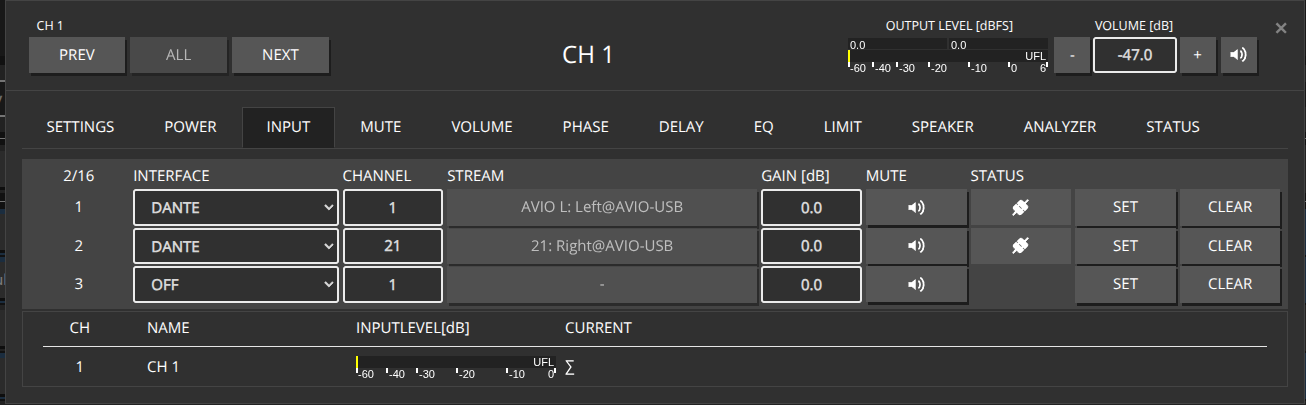
Use the Maxx Control REST API to switch channel input patches (for example Dante slots) with a bulk PUT or per-channel calls. When switching between inputs, there are multiple approaches:

Changing the Input Patch itself

Example Configuration for CH1, CH2, CH4, CH7, switch between Dante Input 1-4 and Dante Input 21-24

HTTP Put a full json object containing all affected Channels into the http://${IP}/rest-api/settings/channel/ path

Advantage: Using the bulk endpoint /settings/channel/ allows you to patch multiple channels in a single HTTP call, which is more efficient than making individual calls for each channel. This reduces network overhead and ensures all channels are updated atomically.

To determine the source_id of the desired Interfaces, perform an HTTP OPTION call to http://${IP}/rest-api/settings/channel/1/dsp/patch' to get a list of available interfaces.

[
  {
    "channel_id": 1,
    "dsp": {
      "patch": [
        {
          "patch_id": 1,
          "source_id": 4,
          "channel": 1
        }
      ]
    }
  },
  {
    "channel_id": 2,
    "dsp": {
      "patch": [
        {
          "patch_id": 1,
          "source_id": 4,
          "channel": 2
        }
      ]
    }
  },
  {
    "channel_id": 4,
    "dsp": {
      "patch": [
        {
          "patch_id": 1,
          "source_id": 4,
          "channel": 3
        }
      ]
    }
  },
  {
    "channel_id": 7,
    "dsp": {
      "patch": [
        {
          "patch_id": 1,
          "source_id": 4,
          "channel": 4
        }
      ]
    }
  }
]
[
  {
    "channel_id": 1,
    "dsp": {
      "patch": [
        {
          "patch_id": 1,
          "source_id": 4,
          "channel": 21,
          "gain": 0.0,
          "mute": false
        }
      ]
    }
  },
  {
    "channel_id": 2,
    "dsp": {
      "patch": [
        {
          "patch_id": 1,
          "source_id": 4,
          "channel": 22,
          "gain": 0.0,
          "mute": false
        }
      ]
    }
  },
  {
    "channel_id": 4,
    "dsp": {
      "patch": [
        {
          "patch_id": 1,
          "source_id": 4,
          "channel": 23,
          "gain": 0.0,
          "mute": false
        }
      ]
    }
  },
  {
    "channel_id": 7,
    "dsp": {
      "patch": [
        {
          "patch_id": 1,
          "source_id": 4,
          "channel": 24,
          "gain": 0.0,
          "mute": false
        }
      ]
    }
  }
]

Patching Channels Individually

Alternatively, you can patch each channel individually by making separate HTTP PUT calls to each channel’s endpoint: http://${IP}/rest-api/settings/channel/{channel_id}/

This approach allows you to update channels one at a time, which can be useful when you need to patch channels conditionally or handle errors per channel.

curl -X 'PUT' http://${IP}/rest-api/settings/channel/1/ \
-H 'Content-Type: application/json' \
-H 'token: f4005bf8507999192162d989d5a60823' \
-d '{
  "channel_id": 1,
  "dsp": {
    "patch": [
      {
        "patch_id": 1,
        "source_id": 4,
        "channel": 1
      }
    ]
  }
}'
curl -X 'PUT' http://${IP}/rest-api/settings/channel/2/ \
-H 'Content-Type: application/json' \
-H 'token: f4005bf8507999192162d989d5a60823' \
-d '{
  "channel_id": 2,
  "dsp": {
    "patch": [
      {
        "patch_id": 1,
        "source_id": 4,
        "channel": 2
      }
    ]
  }
}'
curl -X 'PUT' http://${IP}/rest-api/settings/channel/4/ \
-H 'Content-Type: application/json' \
-H 'token: f4005bf8507999192162d989d5a60823' \
-d '{
  "channel_id": 4,
  "dsp": {
    "patch": [
      {
        "patch_id": 1,
        "source_id": 4,
        "channel": 3
      }
    ]
  }
}'
curl -X 'PUT' http://${IP}/rest-api/settings/channel/7/ \
-H 'Content-Type: application/json' \
-H 'token: f4005bf8507999192162d989d5a60823' \
-d '{
  "channel_id": 7,
  "dsp": {
    "patch": [
      {
        "patch_id": 1,
        "source_id": 4,
        "channel": 4
      }
    ]
  }
}'
curl -X 'PUT' http://${IP}/rest-api/settings/channel/1/ \
-H 'Content-Type: application/json' \
-H 'token: f4005bf8507999192162d989d5a60823' \
-d '{
  "channel_id": 1,
  "dsp": {
    "patch": [
      {
        "patch_id": 1,
        "source_id": 4,
        "channel": 21,
        "gain": 0.0,
        "mute": false
      }
    ]
  }
}'
curl -X 'PUT' http://${IP}/rest-api/settings/channel/2/ \
-H 'Content-Type: application/json' \
-H 'token: f4005bf8507999192162d989d5a60823' \
-d '{
  "channel_id": 2,
  "dsp": {
    "patch": [
      {
        "patch_id": 1,
        "source_id": 4,
        "channel": 22,
        "gain": 0.0,
        "mute": false
      }
    ]
  }
}'
curl -X 'PUT' http://${IP}/rest-api/settings/channel/4/ \
-H 'Content-Type: application/json' \
-H 'token: f4005bf8507999192162d989d5a60823' \
-d '{
  "channel_id": 4,
  "dsp": {
    "patch": [
      {
        "patch_id": 1,
        "source_id": 4,
        "channel": 23,
        "gain": 0.0,
        "mute": false
      }
    ]
  }
}'
curl -X 'PUT' http://${IP}/rest-api/settings/channel/7/ \
-H 'Content-Type: application/json' \
-H 'token: f4005bf8507999192162d989d5a60823' \
-d '{
  "channel_id": 7,
  "dsp": {
    "patch": [
      {
        "patch_id": 1,
        "source_id": 4,
        "channel": 24,
        "gain": 0.0,
        "mute": false
      }
    ]
  }
}'

Toggle Mute between channels

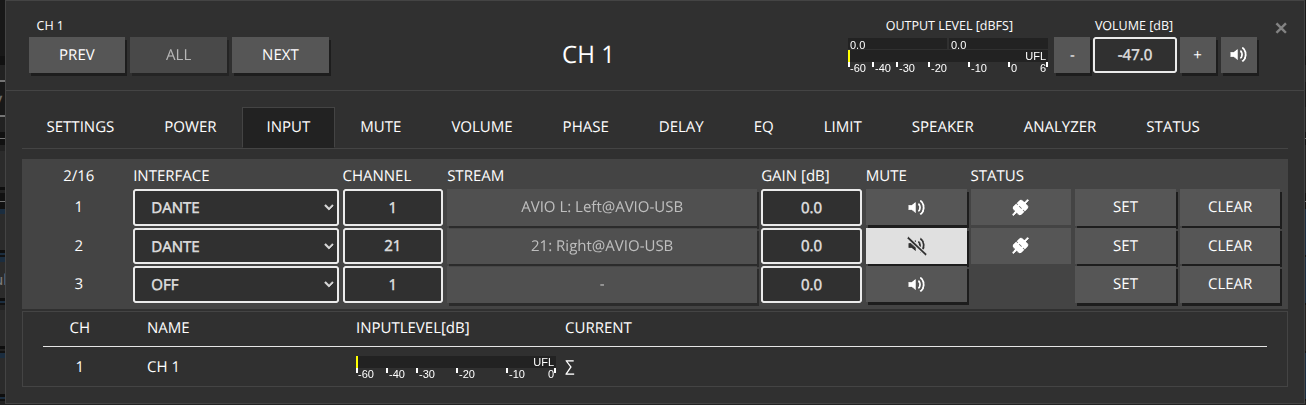
Assuming we’ve already patched our desired Inputs for each channel on Slot 1 and 2

When inputs are already patched, you can toggle the mute state between different patch slots (e.g., Slot 1 and Slot 2) by only updating the mute flag in the patch object. This is more efficient than repatching the entire input configuration.

HTTP Put a JSON object containing all affected Channels into the http://${IP}/rest-api/settings/channel/ path, specifying only the patch_id and mute flag for each patch slot.

[
  {
    "channel_id": 1,
    "dsp": {
      "patch": [
        {
          "patch_id": 1,
          "mute": true
        },
        {
          "patch_id": 2,
          "mute": false
        }
      ]
    }
  },
  {
    "channel_id": 2,
    "dsp": {
      "patch": [
        {
          "patch_id": 1,
          "mute": true
        },
        {
          "patch_id": 2,
          "mute": false
        }
      ]
    }
  },
  {
    "channel_id": 4,
    "dsp": {
      "patch": [
        {
          "patch_id": 1,
          "mute": true
        },
        {
          "patch_id": 2,
          "mute": false
        }
      ]
    }
  },
  {
    "channel_id": 7,
    "dsp": {
      "patch": [
        {
          "patch_id": 1,
          "mute": true
        },
        {
          "patch_id": 2,
          "mute": false
        }
      ]
    }
  }
]
[
  {
    "channel_id": 1,
    "dsp": {
      "patch": [
        {
          "patch_id": 1,
          "mute": false
        },
        {
          "patch_id": 2,
          "mute": true
        }
      ]
    }
  },
  {
    "channel_id": 2,
    "dsp": {
      "patch": [
        {
          "patch_id": 1,
          "mute": false
        },
        {
          "patch_id": 2,
          "mute": true
        }
      ]
    }
  },
  {
    "channel_id": 4,
    "dsp": {
      "patch": [
        {
          "patch_id": 1,
          "mute": false
        },
        {
          "patch_id": 2,
          "mute": true
        }
      ]
    }
  },
  {
    "channel_id": 7,
    "dsp": {
      "patch": [
        {
          "patch_id": 1,
          "mute": false
        },
        {
          "patch_id": 2,
          "mute": true
        }
      ]
    }
  }
]

Toggling Mute on Individual Channels

You can also toggle mute on individual channels by making separate HTTP PUT calls to each channel’s endpoint: http://${IP}/rest-api/settings/channel/{channel_id}/

curl -X 'PUT' http://${IP}/rest-api/settings/channel/1/ \
-H 'Content-Type: application/json' \
-H 'token: f4005bf8507999192162d989d5a60823' \
-d '{
  "channel_id": 1,
  "dsp": {
    "patch": [
      {
        "patch_id": 1,
        "mute": true
      },
      {
        "patch_id": 2,
        "mute": false
      }
    ]
  }
}'
curl -X 'PUT' http://${IP}/rest-api/settings/channel/2/ \
-H 'Content-Type: application/json' \
-H 'token: f4005bf8507999192162d989d5a60823' \
-d '{
  "channel_id": 2,
  "dsp": {
    "patch": [
      {
        "patch_id": 1,
        "mute": true
      },
      {
        "patch_id": 2,
        "mute": false
      }
    ]
  }
}'
curl -X 'PUT' http://${IP}/rest-api/settings/channel/4/ \
-H 'Content-Type: application/json' \
-H 'token: f4005bf8507999192162d989d5a60823' \
-d '{
  "channel_id": 4,
  "dsp": {
    "patch": [
      {
        "patch_id": 1,
        "mute": true
      },
      {
        "patch_id": 2,
        "mute": false
      }
    ]
  }
}'
curl -X 'PUT' http://${IP}/rest-api/settings/channel/7/ \
-H 'Content-Type: application/json' \
-H 'token: f4005bf8507999192162d989d5a60823' \
-d '{
  "channel_id": 7,
  "dsp": {
    "patch": [
      {
        "patch_id": 1,
        "mute": true
      },
      {
        "patch_id": 2,
        "mute": false
      }
    ]
  }
}'

9 - Amp enable

Power-enable channel amplifier stages via ampenable (distinct from mute).

Power-enable a channel amplifier stage (distinct from mute):

PUT /settings/channel/{channel_id}/ampenable

curl -X PUT "http://${IP}/rest-api/settings/channel/1/ampenable" \
  -H "token: f4005bf8507999192162d989d5a60823" \
  -H "Content-Type: application/json" \
  -d '{"value": true}'

Use "value": false to disable. Multi-channel updates can go through PUT /settings/channel with ampenable on each object.

10 - Save / persist

Persist runtime REST changes with /settings/save and check save status.

Runtime changes are held until they are saved. Trigger a manual save with:

PUT /settings/save (token required; no JSON body)

curl -X PUT "http://${IP}/rest-api/settings/save" \
  -H "token: f4005bf8507999192162d989d5a60823"

Check save / autosave state with GET /status/save.