This is the multi-page printable view of this section. Click here to print.

Return to the regular view of this page.

REST-API

The REST-API for Innosonix Devices

All function, the devices offers are available via the integrated REST-API.

The API is based on HTTP PUT / GET / OPTIONS / DELETE calls with JSON payload.

Every PUT / DELETE call has to be verified via a “Authentication Token” in the HTTP header. The default token is: “f4005bf8507999192162d989d5a60823”

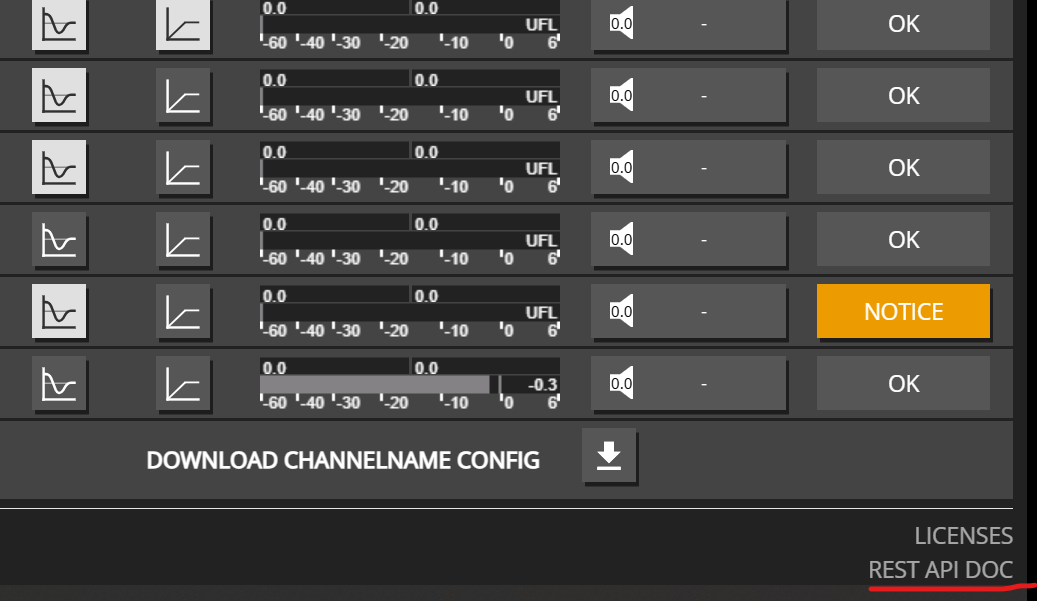
This documentation is more dedicated as general overview and description how to handle the API. Each device includes the latest API-Documentation with all available calls.

It can be found on the lower right corner of the OVERVIEW page:

Overall Structure

It’s an hierarchical REST API with partial resource updates, structured per channel and it’s corresponding resources like DSP / EQ / VOLUME / etc.

That means you can basically update the whole device with up to 32 channels, with a single HTTP PUT call like a HTTP PUT on http://{IP}/rest-api/settings with a json payload containing the requested structure.

  • settings/
    • channel/
      • 1/
        • ampenable
        • dsp/
          • delay
          • eq
          • fir
          • mute
      • 2/
        • ampenable
        • dsp/
          • delay
          • eq
          • fir
          • mute
      • etc…
    • device/
      • dante/
    • etc…

On the other hand, update single resources down in the tree is also possible, e.g. http://{IP}/rest-api/settings/channel/1/ampenable

1 - Channel Naming

Examples for getting and setting channel names

Channel Name Management

Channel names help you identify and organize your amplifier channels. Names can contain alphanumeric characters, spaces, and special characters.

Get Channel Name

Retrieve the current name of a channel:

curl -X 'GET' http://${IP}/rest-api/settings/channel/1/name
{
  "value": "Living Room Left"
}

Set Channel Name

Set or update the name of a channel. Channel names can be up to 256 characters and support:

  • Letters (a-z, A-Z)
  • Numbers (0-9)
  • Spaces
  • Special characters: äöü:_()!%+*#-
curl -X 'PUT' http://${IP}/rest-api/settings/channel/1/name \
-H 'Content-Type: application/json' \
-H 'token: f4005bf8507999192162d989d5a60823' \
-d '{
  "value": "Living Room Left"
}'
{
  "value": "Living Room Left"
}

Set Multiple Channel Names

Set names for multiple channels in a single request:

curl -X 'PUT' http://${IP}/rest-api/settings/channel/ \
-H 'Content-Type: application/json' \
-H 'token: f4005bf8507999192162d989d5a60823' \
-d '[
  {
    "channel_id": 1,
    "name": {
      "value": "Living Room Left"
    }
  },
  {
    "channel_id": 2,
    "name": {
      "value": "Living Room Right"
    }
  },
  {
    "channel_id": 3,
    "name": {
      "value": "Kitchen"
    }
  },
  {
    "channel_id": 4,
    "name": {
      "value": "Bedroom"
    }
  }
]'
[
  {
    "channel_id": 1,
    "name": {
      "value": "Living Room Left"
    }
  },
  {
    "channel_id": 2,
    "name": {
      "value": "Living Room Right"
    }
  },
  {
    "channel_id": 3,
    "name": {
      "value": "Kitchen"
    }
  },
  {
    "channel_id": 4,
    "name": {
      "value": "Bedroom"
    }
  }
]

Get Maximum Channel Name Length

Check the maximum allowed length for channel names:

curl -X 'OPTIONS' http://${IP}/rest-api/settings/channel/1/name
{
  "length": 256
}

Example: Naming a Multi-Zone Setup

Here’s a practical example for naming channels in a multi-zone audio system:

curl -X 'PUT' http://${IP}/rest-api/settings/channel/ \
-H 'Content-Type: application/json' \
-H 'token: f4005bf8507999192162d989d5a60823' \
-d '[
  {
    "channel_id": 1,
    "name": {
      "value": "Zone 1 - Main"
    }
  },
  {
    "channel_id": 2,
    "name": {
      "value": "Zone 2 - Kitchen"
    }
  },
  {
    "channel_id": 3,
    "name": {
      "value": "Zone 3 - Bedroom"
    }
  },
  {
    "channel_id": 4,
    "name": {
      "value": "Zone 4 - Office"
    }
  }
]'
[
  {
    "channel_id": 1,
    "name": {
      "value": "Zone 1 - Main"
    }
  },
  {
    "channel_id": 2,
    "name": {
      "value": "Zone 2 - Kitchen"
    }
  },
  {
    "channel_id": 3,
    "name": {
      "value": "Zone 3 - Bedroom"
    }
  },
  {
    "channel_id": 4,
    "name": {
      "value": "Zone 4 - Office"
    }
  }
]

Tip: Use descriptive channel names to make your system easier to manage, especially when integrating with home automation systems or control interfaces.

2 - Device Control

Examples for device-level controls (master mute, volume, startup settings)

Device-Level Controls

Device-level controls affect all channels globally. These are useful for master volume control, emergency mute, and startup behavior configuration.

Device Mute

The device mute acts as a master mute that affects all channels, regardless of individual channel mute settings.

Get Device Mute State

curl -X 'GET' http://${IP}/rest-api/settings/device/dsp/mute
{
  "value": false
}

Set Device Mute

curl -X 'PUT' http://${IP}/rest-api/settings/device/dsp/mute \
-H 'Content-Type: application/json' \
-H 'token: f4005bf8507999192162d989d5a60823' \
-d '{
  "value": true
}'
curl -X 'PUT' http://${IP}/rest-api/settings/device/dsp/mute \
-H 'Content-Type: application/json' \
-H 'token: f4005bf8507999192162d989d5a60823' \
-d '{
  "value": false
}'

Device Volume

The device volume acts as a master volume control that affects all channels. Individual channel volumes are relative to this setting.

Get Device Volume

curl -X 'GET' http://${IP}/rest-api/settings/device/dsp/volume
{
  "value": 0.0
}

Set Device Volume

curl -X 'PUT' http://${IP}/rest-api/settings/device/dsp/volume \
-H 'Content-Type: application/json' \
-H 'token: f4005bf8507999192162d989d5a60823' \
-d '{
  "value": -5.0
}'
{
  "value": -5.0
}

Note: Device volume range is -72.0 dB to +24.0 dB. This setting affects all channels globally.

Startup Mute

Configure whether the device should start muted after a reboot or power cycle.

Get Startup Mute Setting

curl -X 'GET' http://${IP}/rest-api/settings/device/dsp/startupmute
{
  "value": false
}

Set Startup Mute

When enabled, the device will start muted after reboot or power cycle:

curl -X 'PUT' http://${IP}/rest-api/settings/device/dsp/startupmute \
-H 'Content-Type: application/json' \
-H 'token: f4005bf8507999192162d989d5a60823' \
-d '{
  "value": true
}'
curl -X 'PUT' http://${IP}/rest-api/settings/device/dsp/startupmute \
-H 'Content-Type: application/json' \
-H 'token: f4005bf8507999192162d989d5a60823' \
-d '{
  "value": false
}'

Use Case: Enable startup mute to prevent audio from playing immediately after power restoration, giving you time to verify system status before audio begins.

Complete Device Control Example

Here’s an example that combines multiple device-level controls:

# Set device to start muted
curl -X 'PUT' http://${IP}/rest-api/settings/device/dsp/startupmute \
-H 'Content-Type: application/json' \
-H 'token: f4005bf8507999192162d989d5a60823' \
-d '{"value": true}'

# Set master volume to a safe level
curl -X 'PUT' http://${IP}/rest-api/settings/device/dsp/volume \
-H 'Content-Type: application/json' \
-H 'token: f4005bf8507999192162d989d5a60823' \
-d '{"value": -10.0}'

# Unmute device when ready
curl -X 'PUT' http://${IP}/rest-api/settings/device/dsp/mute \
-H 'Content-Type: application/json' \
-H 'token: f4005bf8507999192162d989d5a60823' \
-d '{"value": false}'

3 - Device Information

Examples for retrieving device information

Getting Device Information

The device information endpoint provides details about your amplifier model, available channels, installed options, and hardware features.

Get Device Information

Retrieve all device information with a simple GET request:

curl -X 'GET' http://${IP}/rest-api/info/device
{
  "model_name": "MA32D",
  "channel": 32,
  "options": ["IF1", "IF2", "D1", "D2"],
  "psu_fan": true,
  "housing_fan": true
}

Understanding the Response

  • model_name: The amplifier model (e.g., MA32D, MA32LP, MA24D2)
  • channel: Number of available channels (16-32)
  • options: Array of installed options:
    • IF1, IF2, IF3: Interface options
    • D1, D2, D3: Dante options
    • M1: Additional options
  • psu_fan: Whether PSU fan is installed
  • housing_fan: Whether housing fan is installed

This information is useful for:

  • Verifying device capabilities before making API calls
  • Determining available channel count
  • Checking installed hardware options
  • Building device-specific automation logic

4 - EQ Enable Control

Examples for enabling and disabling channel equalizers

DSP EQ Enable / Disable

The EQ enable control allows you to turn the entire channel equalizer on or off. This is useful when you want to temporarily bypass all EQ processing for testing or when switching between different audio processing modes.

Enable EQ for Multiple Channels

Enable the equalizer for multiple channels in a single request:

curl -X 'PUT' http://${IP}/rest-api/settings/channel/ \
-H 'Content-Type: application/json' \
-H 'token: f4005bf8507999192162d989d5a60823' \
-d '[
  {
    "channel_id": 1,
    "dsp": {
      "eqenable": {
        "value": true
      }
    }
  },
  {
    "channel_id": 2,
    "dsp": {
      "eqenable": {
        "value": true
      }
    }
  },
  {
    "channel_id": 3,
    "dsp": {
      "eqenable": {
        "value": true
      }
    }
  }
]'
[
  {
    "channel_id": 1,
    "dsp": {
      "eqenable": {
        "value": true
      }
    }
  },
  {
    "channel_id": 2,
    "dsp": {
      "eqenable": {
        "value": true
      }
    }
  },
  {
    "channel_id": 3,
    "dsp": {
      "eqenable": {
        "value": true
      }
    }
  }
]

Disable EQ for Multiple Channels

Disable the equalizer for multiple channels:

curl -X 'PUT' http://${IP}/rest-api/settings/channel/ \
-H 'Content-Type: application/json' \
-H 'token: f4005bf8507999192162d989d5a60823' \
-d '[
  {
    "channel_id": 1,
    "dsp": {
      "eqenable": {
        "value": false
      }
    }
  },
  {
    "channel_id": 2,
    "dsp": {
      "eqenable": {
        "value": false
      }
    }
  },
  {
    "channel_id": 3,
    "dsp": {
      "eqenable": {
        "value": false
      }
    }
  }
]'
[
  {
    "channel_id": 1,
    "dsp": {
      "eqenable": {
        "value": false
      }
    }
  },
  {
    "channel_id": 2,
    "dsp": {
      "eqenable": {
        "value": false
      }
    }
  },
  {
    "channel_id": 3,
    "dsp": {
      "eqenable": {
        "value": false
      }
    }
  }
]

Single Channel EQ Control

Enable or disable EQ for a single channel:

curl -X 'PUT' http://${IP}/rest-api/settings/channel/1/dsp/eqenable \
-H 'Content-Type: application/json' \
-H 'token: f4005bf8507999192162d989d5a60823' \
-d '{
  "value": true
}'
curl -X 'PUT' http://${IP}/rest-api/settings/channel/1/dsp/eqenable \
-H 'Content-Type: application/json' \
-H 'token: f4005bf8507999192162d989d5a60823' \
-d '{
  "value": false
}'

Get EQ Enable State

Check if EQ is enabled for a channel:

curl -X 'GET' http://${IP}/rest-api/settings/channel/1/dsp/eqenable
{
  "value": true
}

Multizone Example

Example for controlling EQ across multiple zones (channels 1, 2, 3, 11, 12, 13):

curl -X 'PUT' http://${IP}/rest-api/settings/channel/ \
-H 'Content-Type: application/json' \
-H 'token: f4005bf8507999192162d989d5a60823' \
-d '[
  {
    "channel_id": 1,
    "dsp": {
      "eqenable": {
        "value": true
      }
    }
  },
  {
    "channel_id": 2,
    "dsp": {
      "eqenable": {
        "value": true
      }
    }
  },
  {
    "channel_id": 3,
    "dsp": {
      "eqenable": {
        "value": true
      }
    }
  },
  {
    "channel_id": 11,
    "dsp": {
      "eqenable": {
        "value": true
      }
    }
  },
  {
    "channel_id": 12,
    "dsp": {
      "eqenable": {
        "value": true
      }
    }
  },
  {
    "channel_id": 13,
    "dsp": {
      "eqenable": {
        "value": true
      }
    }
  }
]'
[
  {
    "channel_id": 1,
    "dsp": {
      "eqenable": {
        "value": true
      }
    }
  },
  {
    "channel_id": 2,
    "dsp": {
      "eqenable": {
        "value": true
      }
    }
  },
  {
    "channel_id": 3,
    "dsp": {
      "eqenable": {
        "value": true
      }
    }
  },
  {
    "channel_id": 11,
    "dsp": {
      "eqenable": {
        "value": true
      }
    }
  },
  {
    "channel_id": 12,
    "dsp": {
      "eqenable": {
        "value": true
      }
    }
  },
  {
    "channel_id": 13,
    "dsp": {
      "eqenable": {
        "value": true
      }
    }
  }
]

Note: When EQ is disabled, all equalizer settings (filters, gains, etc.) are bypassed, but the settings themselves are preserved. Re-enabling EQ will restore the previous equalizer configuration.

5 - Mute Control

Examples for controlling channel and device mute states

Channel Mute Control

Mute control allows you to silence individual channels or the entire device.

Get Channel Mute State

Check if a channel is currently muted:

curl -X 'GET' http://${IP}/rest-api/settings/channel/1/dsp/mute
{
  "value": false
}

Mute a Single Channel

Mute a specific channel:

curl -X 'PUT' http://${IP}/rest-api/settings/channel/1/dsp/mute \
-H 'Content-Type: application/json' \
-H 'token: f4005bf8507999192162d989d5a60823' \
-d '{
  "value": true
}'
{
  "value": true
}

Unmute a Single Channel

Unmute a specific channel:

curl -X 'PUT' http://${IP}/rest-api/settings/channel/1/dsp/mute \
-H 'Content-Type: application/json' \
-H 'token: f4005bf8507999192162d989d5a60823' \
-d '{
  "value": false
}'
{
  "value": false
}

Mute Multiple Channels

Mute or unmute multiple channels in a single request:

curl -X 'PUT' http://${IP}/rest-api/settings/channel/ \
-H 'Content-Type: application/json' \
-H 'token: f4005bf8507999192162d989d5a60823' \
-d '[
  {
    "channel_id": 1,
    "dsp": {
      "mute": {
        "value": true
      }
    }
  },
  {
    "channel_id": 2,
    "dsp": {
      "mute": {
        "value": true
      }
    }
  },
  {
    "channel_id": 3,
    "dsp": {
      "mute": {
        "value": true
      }
    }
  }
]'
[
  {
    "channel_id": 1,
    "dsp": {
      "mute": {
        "value": true
      }
    }
  },
  {
    "channel_id": 2,
    "dsp": {
      "mute": {
        "value": true
      }
    }
  },
  {
    "channel_id": 3,
    "dsp": {
      "mute": {
        "value": true
      }
    }
  }
]

Toggle Mute for Multiple Channels

Toggle mute state for multiple channels (mute some, unmute others):

curl -X 'PUT' http://${IP}/rest-api/settings/channel/ \
-H 'Content-Type: application/json' \
-H 'token: f4005bf8507999192162d989d5a60823' \
-d '[
  {
    "channel_id": 1,
    "dsp": {
      "mute": {
        "value": true
      }
    }
  },
  {
    "channel_id": 2,
    "dsp": {
      "mute": {
        "value": false
      }
    }
  }
]'
[
  {
    "channel_id": 1,
    "dsp": {
      "mute": {
        "value": true
      }
    }
  },
  {
    "channel_id": 2,
    "dsp": {
      "mute": {
        "value": false
      }
    }
  }
]

Device Mute Control

Control the main device mute that affects all channels:

Get Device Mute State

curl -X 'GET' http://${IP}/rest-api/settings/device/dsp/mute
{
  "value": false
}

Set Device Mute

curl -X 'PUT' http://${IP}/rest-api/settings/device/dsp/mute \
-H 'Content-Type: application/json' \
-H 'token: f4005bf8507999192162d989d5a60823' \
-d '{
  "value": true
}'
curl -X 'PUT' http://${IP}/rest-api/settings/device/dsp/mute \
-H 'Content-Type: application/json' \
-H 'token: f4005bf8507999192162d989d5a60823' \
-d '{
  "value": false
}'

Note: Device mute acts as a master mute control. When device mute is enabled, all channels are muted regardless of individual channel mute settings.

6 - Volume Control

Examples for controlling channel and device volume

Channel Volume Control

Volume control is one of the most common operations. You can control individual channels or multiple channels at once.

Get Channel Volume

Retrieve the current volume setting for a specific channel:

curl -X 'GET' http://${IP}/rest-api/settings/channel/1/dsp/volume
{
  "value": -10.5
}

Set Single Channel Volume

Set the volume for a single channel. Volume range is -72.0 dB to +24.0 dB:

curl -X 'PUT' http://${IP}/rest-api/settings/channel/1/dsp/volume \
-H 'Content-Type: application/json' \
-H 'token: f4005bf8507999192162d989d5a60823' \
-d '{
  "value": -10.5
}'
{
  "value": -10.5
}

Set Multiple Channel Volumes

Update volumes for multiple channels in a single request. This is more efficient than individual calls:

curl -X 'PUT' http://${IP}/rest-api/settings/channel/ \
-H 'Content-Type: application/json' \
-H 'token: f4005bf8507999192162d989d5a60823' \
-d '[
  {
    "channel_id": 1,
    "dsp": {
      "volume": {
        "value": -10.5
      }
    }
  },
  {
    "channel_id": 2,
    "dsp": {
      "volume": {
        "value": -12.0
      }
    }
  },
  {
    "channel_id": 3,
    "dsp": {
      "volume": {
        "value": -8.5
      }
    }
  }
]'
[
  {
    "channel_id": 1,
    "dsp": {
      "volume": {
        "value": -10.5
      }
    }
  },
  {
    "channel_id": 2,
    "dsp": {
      "volume": {
        "value": -12.0
      }
    }
  },
  {
    "channel_id": 3,
    "dsp": {
      "volume": {
        "value": -8.5
      }
    }
  }
]

Get Volume Parameter Range

Check the valid volume range and step size for a channel:

curl -X 'OPTIONS' http://${IP}/rest-api/settings/channel/1/dsp/volume
{
  "value": [-72.0, 24.0, 0.1, "dB"]
}

The response format is [MIN, MAX, STEP, UNIT]:

  • MIN: -72.0 dB (minimum volume)
  • MAX: 24.0 dB (maximum volume)
  • STEP: 0.1 dB (volume adjustment step)
  • UNIT: “dB” (decibels)

Device Volume Control

Control the main device volume that affects all channels:

Get Device Volume

curl -X 'GET' http://${IP}/rest-api/settings/device/dsp/volume
{
  "value": 0.0
}

Set Device Volume

curl -X 'PUT' http://${IP}/rest-api/settings/device/dsp/volume \
-H 'Content-Type: application/json' \
-H 'token: f4005bf8507999192162d989d5a60823' \
-d '{
  "value": -5.0
}'
{
  "value": -5.0
}

Note: Device volume acts as a master volume control affecting all channels. Individual channel volumes are relative to this device volume setting.

7 - Input Patch

Some REST-API use cases for select different Inputs

When switching between Inputs, there are multiple approaches valid:

Changing the Input Patch itself

Example Configuration for CH1, CH2, CH4, CH7, switch between Dante Input 1-4 and Dante Input 21-24

HTTP Put a full json object containing all affected Channels into the http://${IP}/rest-api/settings/channel/ path

Advantage: Using the bulk endpoint /settings/channel/ allows you to patch multiple channels in a single HTTP call, which is more efficient than making individual calls for each channel. This reduces network overhead and ensures all channels are updated atomically.

To determine the source_id of the desired Interfaces, perform an HTTP OPTION call to http://${IP}/rest-api/settings/channel/1/dsp/patch' to get a list of available interfaces.

[
  {
    "channel_id": 1,
    "dsp": {
      "patch": [
        {
          "patch_id": 1,
          "source_id": 4,
          "channel": 1
        }
      ]
    }
  },
  {
    "channel_id": 2,
    "dsp": {
      "patch": [
        {
          "patch_id": 1,
          "source_id": 4,
          "channel": 2
        }
      ]
    }
  },
  {
    "channel_id": 4,
    "dsp": {
      "patch": [
        {
          "patch_id": 1,
          "source_id": 4,
          "channel": 3
        }
      ]
    }
  },
  {
    "channel_id": 7,
    "dsp": {
      "patch": [
        {
          "patch_id": 1,
          "source_id": 4,
          "channel": 4
        }
      ]
    }
  }
]
[
  {
    "channel_id": 1,
    "dsp": {
      "patch": [
        {
          "patch_id": 1,
          "source_id": 4,
          "channel": 21,
          "gain": 0.0,
          "mute": false
        }
      ]
    }
  },
  {
    "channel_id": 2,
    "dsp": {
      "patch": [
        {
          "patch_id": 1,
          "source_id": 4,
          "channel": 22,
          "gain": 0.0,
          "mute": false
        }
      ]
    }
  },
  {
    "channel_id": 4,
    "dsp": {
      "patch": [
        {
          "patch_id": 1,
          "source_id": 4,
          "channel": 23,
          "gain": 0.0,
          "mute": false
        }
      ]
    }
  },
  {
    "channel_id": 7,
    "dsp": {
      "patch": [
        {
          "patch_id": 1,
          "source_id": 4,
          "channel": 24,
          "gain": 0.0,
          "mute": false
        }
      ]
    }
  }
]

Patching Channels Individually

Alternatively, you can patch each channel individually by making separate HTTP PUT calls to each channel’s endpoint: http://${IP}/rest-api/settings/channel/{channel_id}/
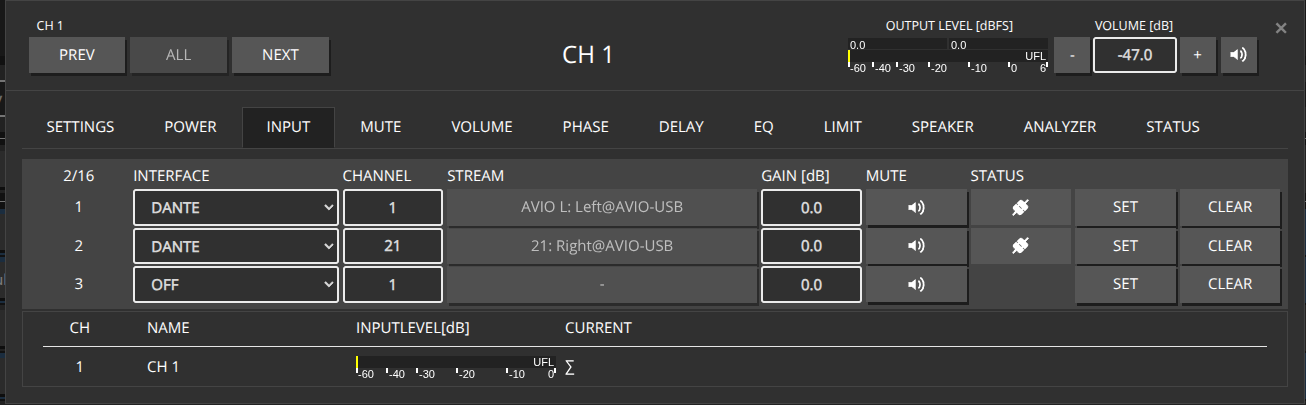
This approach allows you to update channels one at a time, which can be useful when you need to patch channels conditionally or handle errors per channel.

curl -X 'PUT' http://${IP}/rest-api/settings/channel/1/ \
-H 'Content-Type: application/json' \
-H 'token: f4005bf8507999192162d989d5a60823' \
-d '{
  "channel_id": 1,
  "dsp": {
    "patch": [
      {
        "patch_id": 1,
        "source_id": 4,
        "channel": 1
      }
    ]
  }
}'
curl -X 'PUT' http://${IP}/rest-api/settings/channel/2/ \
-H 'Content-Type: application/json' \
-H 'token: f4005bf8507999192162d989d5a60823' \
-d '{
  "channel_id": 2,
  "dsp": {
    "patch": [
      {
        "patch_id": 1,
        "source_id": 4,
        "channel": 2
      }
    ]
  }
}'
curl -X 'PUT' http://${IP}/rest-api/settings/channel/4/ \
-H 'Content-Type: application/json' \
-H 'token: f4005bf8507999192162d989d5a60823' \
-d '{
  "channel_id": 4,
  "dsp": {
    "patch": [
      {
        "patch_id": 1,
        "source_id": 4,
        "channel": 3
      }
    ]
  }
}'
curl -X 'PUT' http://${IP}/rest-api/settings/channel/7/ \
-H 'Content-Type: application/json' \
-H 'token: f4005bf8507999192162d989d5a60823' \
-d '{
  "channel_id": 7,
  "dsp": {
    "patch": [
      {
        "patch_id": 1,
        "source_id": 4,
        "channel": 4
      }
    ]
  }
}'
curl -X 'PUT' http://${IP}/rest-api/settings/channel/1/ \
-H 'Content-Type: application/json' \
-H 'token: f4005bf8507999192162d989d5a60823' \
-d '{
  "channel_id": 1,
  "dsp": {
    "patch": [
      {
        "patch_id": 1,
        "source_id": 4,
        "channel": 21,
        "gain": 0.0,
        "mute": false
      }
    ]
  }
}'
curl -X 'PUT' http://${IP}/rest-api/settings/channel/2/ \
-H 'Content-Type: application/json' \
-H 'token: f4005bf8507999192162d989d5a60823' \
-d '{
  "channel_id": 2,
  "dsp": {
    "patch": [
      {
        "patch_id": 1,
        "source_id": 4,
        "channel": 22,
        "gain": 0.0,
        "mute": false
      }
    ]
  }
}'
curl -X 'PUT' http://${IP}/rest-api/settings/channel/4/ \
-H 'Content-Type: application/json' \
-H 'token: f4005bf8507999192162d989d5a60823' \
-d '{
  "channel_id": 4,
  "dsp": {
    "patch": [
      {
        "patch_id": 1,
        "source_id": 4,
        "channel": 23,
        "gain": 0.0,
        "mute": false
      }
    ]
  }
}'
curl -X 'PUT' http://${IP}/rest-api/settings/channel/7/ \
-H 'Content-Type: application/json' \
-H 'token: f4005bf8507999192162d989d5a60823' \
-d '{
  "channel_id": 7,
  "dsp": {
    "patch": [
      {
        "patch_id": 1,
        "source_id": 4,
        "channel": 24,
        "gain": 0.0,
        "mute": false
      }
    ]
  }
}'

Toggle Mute between channels

Assuming we’ve already patched our desired Inputs for each channel on Slot 1 and 2

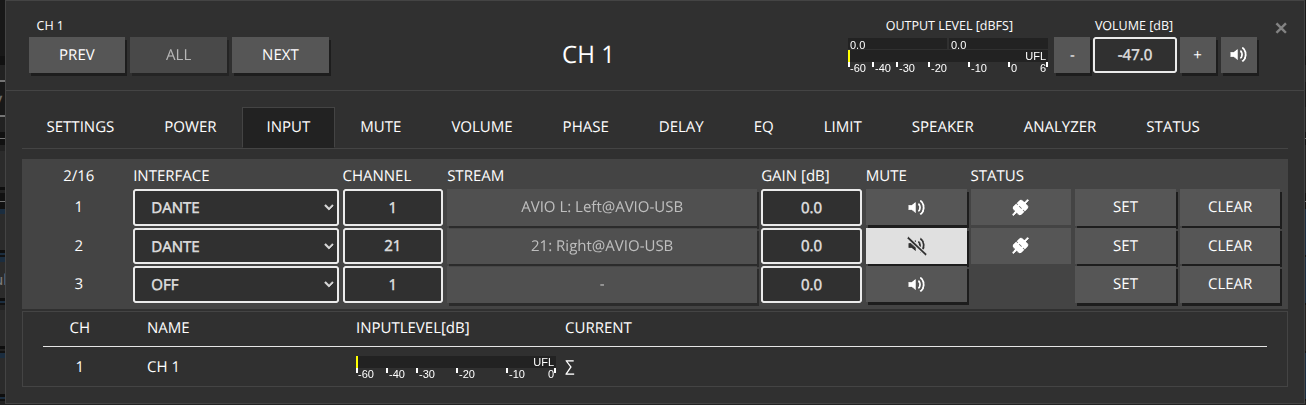
When inputs are already patched, you can toggle the mute state between different patch slots (e.g., Slot 1 and Slot 2) by only updating the mute flag in the patch object. This is more efficient than repatching the entire input configuration.

HTTP Put a JSON object containing all affected Channels into the http://${IP}/rest-api/settings/channel/ path, specifying only the patch_id and mute flag for each patch slot.

[
  {
    "channel_id": 1,
    "dsp": {
      "patch": [
        {
          "patch_id": 1,
          "mute": true
        },
        {
          "patch_id": 2,
          "mute": false
        }
      ]
    }
  },
  {
    "channel_id": 2,
    "dsp": {
      "patch": [
        {
          "patch_id": 1,
          "mute": true
        },
        {
          "patch_id": 2,
          "mute": false
        }
      ]
    }
  },
  {
    "channel_id": 4,
    "dsp": {
      "patch": [
        {
          "patch_id": 1,
          "mute": true
        },
        {
          "patch_id": 2,
          "mute": false
        }
      ]
    }
  },
  {
    "channel_id": 7,
    "dsp": {
      "patch": [
        {
          "patch_id": 1,
          "mute": true
        },
        {
          "patch_id": 2,
          "mute": false
        }
      ]
    }
  }
]
[
  {
    "channel_id": 1,
    "dsp": {
      "patch": [
        {
          "patch_id": 1,
          "mute": false
        },
        {
          "patch_id": 2,
          "mute": true
        }
      ]
    }
  },
  {
    "channel_id": 2,
    "dsp": {
      "patch": [
        {
          "patch_id": 1,
          "mute": false
        },
        {
          "patch_id": 2,
          "mute": true
        }
      ]
    }
  },
  {
    "channel_id": 4,
    "dsp": {
      "patch": [
        {
          "patch_id": 1,
          "mute": false
        },
        {
          "patch_id": 2,
          "mute": true
        }
      ]
    }
  },
  {
    "channel_id": 7,
    "dsp": {
      "patch": [
        {
          "patch_id": 1,
          "mute": false
        },
        {
          "patch_id": 2,
          "mute": true
        }
      ]
    }
  }
]

Toggling Mute on Individual Channels

You can also toggle mute on individual channels by making separate HTTP PUT calls to each channel’s endpoint: http://${IP}/rest-api/settings/channel/{channel_id}/
curl -X 'PUT' http://${IP}/rest-api/settings/channel/1/ \
-H 'Content-Type: application/json' \
-H 'token: f4005bf8507999192162d989d5a60823' \
-d '{
  "channel_id": 1,
  "dsp": {
    "patch": [
      {
        "patch_id": 1,
        "mute": true
      },
      {
        "patch_id": 2,
        "mute": false
      }
    ]
  }
}'
curl -X 'PUT' http://${IP}/rest-api/settings/channel/2/ \
-H 'Content-Type: application/json' \
-H 'token: f4005bf8507999192162d989d5a60823' \
-d '{
  "channel_id": 2,
  "dsp": {
    "patch": [
      {
        "patch_id": 1,
        "mute": true
      },
      {
        "patch_id": 2,
        "mute": false
      }
    ]
  }
}'
curl -X 'PUT' http://${IP}/rest-api/settings/channel/4/ \
-H 'Content-Type: application/json' \
-H 'token: f4005bf8507999192162d989d5a60823' \
-d '{
  "channel_id": 4,
  "dsp": {
    "patch": [
      {
        "patch_id": 1,
        "mute": true
      },
      {
        "patch_id": 2,
        "mute": false
      }
    ]
  }
}'
curl -X 'PUT' http://${IP}/rest-api/settings/channel/7/ \
-H 'Content-Type: application/json' \
-H 'token: f4005bf8507999192162d989d5a60823' \
-d '{
  "channel_id": 7,
  "dsp": {
    "patch": [
      {
        "patch_id": 1,
        "mute": true
      },
      {
        "patch_id": 2,
        "mute": false
      }
    ]
  }
}'